HamLog
See http://pignology.net/piglet for more information and demo videos.
The current version has support for Elecraft K3, KX3, K2, Yaesu FT-817, 857, 897, and Kenwood TS-480/590/2000.
Information on PigRemote can be found at http://pignology.net/pigremoteNOTE: This app has ADIF Export AND Import and QRZ XML Lookup integration.
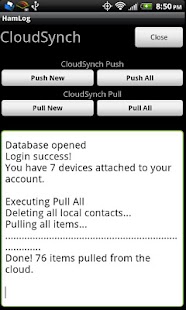
As well as CloudSynch to synchronize logs across devices and platforms (Android/iOS)
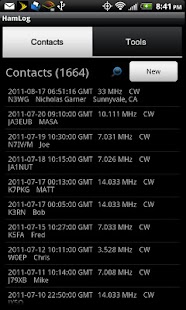
HamLog is an amateur radio logging application with many useful tools built-in.
It is meant for use when operating portable from the field or mobile (drive safe!).
It supports name and QTH lookup via the Cell network or WLAN.
It supports both Import and Export of logs in ADIF format and has integration with the QRZ XML Lookup service.
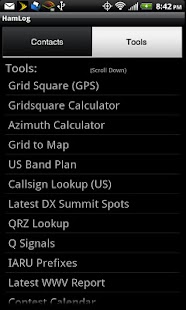
Tools:QRZ XML Subscriber IntegrationGridsquare from GPSGrid Calc from lat/longAzimuth/Bearing CalculatorDX ClusterGrid to MapUS Band PlanCallsign LookupDX SpotsQRZ LookupQ SignalsIARU PrefixesWWV ReportContest CalendarDXpedition CalendarHF Nets ListRing the PhoneLog SearchHamLog CloudSynch (see http://hamlog.it for more info)Rapid Fire mode for quickly adding contacts in a pile-up.Field Day Logger with suport for HamLog Field Day Server
73,NickN3WG
About HamLog
- Package name (App ID)
- com.n3wg.hamlog
- Available on
- Google Play
- Price
- Free
- Version
- v4.957
- Developer
- Matthew P Miller
Looking for the HamLog APK?
The safest way to get HamLog (com.n3wg.hamlog) on your Android device is to install it directly from Google Play — you'll always get the latest official version, automatic updates, and no risk of modified or infected APK files from third-party sites.
Social Features
Connect and share with friends and the community.
Camera Features
Advanced camera features with editing capabilities.
Fitness Tracking
Track your workouts and monitor your health metrics.
See HamLog in Action
Frequently Asked Questions
Is HamLog free?
Yes, HamLog is free to download and install on Android through Google Play.
How do I install HamLog on Android?
Open Google Play on your Android phone or tablet, search for HamLog by Matthew P Miller or tap the Google Play button on this page, then tap Install. The app downloads and installs automatically.
What is com.n3wg.hamlog?
com.n3wg.hamlog is the App ID (package name) of HamLog on Google Play. Every Android app has a unique package name, and it is the safest way to verify you are installing the official app.
Is HamLog safe to download?
Installing HamLog from Google Play is the safest option: you get the official version published by Matthew P Miller, verified by Google Play Protect, with automatic updates. Avoid APK files from unofficial third-party sites.
Get HamLog Today
HamLog for Android — free download on Google Play.
Compatible with Android phones and tablets — available on Google Play.
Ask AI about this app
Get instant answers about features, tips and more from popular AI assistants.